










Want inbox placement for your emails?
You’ve written the perfect subject line. Your design is flawless. Your list is warm and engaged. You hit send, and then what? For millions of marketers and developers, the uncomfortable truth is that a significant chunk of those emails never land where they’re supposed to the inbox.
Inbox placement is the percentage of your emails that arrive in the recipient’s primary inbox, not the spam folder, not the promotions tab, and not lost in transit. It’s one of the most critical yet least understood metrics in email marketing, and it has a direct impact on open rates, conversions, and ultimately, revenue.
In this guide, we’ll break down exactly what drives inbox placement, how to measure it accurately, and the practical steps you can take today to make sure your emails stop disappearing and start performing.
table of contents
- What is inbox placement?
- What determines inbox placement?
- Why does inbox placement matter?
- Email inbox placement vs open rates
- How to improve inbox placement?
- Inbox placement testing
- Best tools to improve inbox placement rate
- FAQs
- Final thoughts
What is inbox placement?
Inbox placement is the percentage of your sent emails that actually land in the recipient’s primary inbox, rather than being filtered into spam, junk, the promotions tab, or blocked entirely.
It’s different from the delivery rate, which only measures whether a receiving mail server accepted your email. Acceptance doesn’t mean the recipient ever sees it. Inbox placement tells you what happened after that handoff.
A simple way to think about it:
- Sent → 100 emails dispatched
- Delivered → 98 accepted by the server (2 hard bounced)
- Inbox placed → 80 of those 98 reached the inbox (18 went to spam)
Your delivery rate looks great at 98%, but your inbox placement rate is only 82%, meaning nearly 1 in 5 emails is effectively invisible to your audience.
What determines inbox placement?
Mail providers like Gmail, Outlook, and Yahoo use a mix of signals to decide where an email lands:
- Sender reputation — your IP and domain’s sending history
- Authentication — whether SPF, DKIM, and DMARC are properly configured
- Engagement signals — do recipients open, click, and reply, or mark as spam?
- Content quality — spammy language, excessive links, or misleading subject lines hurt placement
- List hygiene — sending to invalid or inactive addresses damages your reputation over time
Why does inbox placement matter?
Inbox placement is ultimately a revenue metric. An email in the spam folder has a near-zero chance of being opened. Even landing in Gmail’s Promotions tab can cut open rates significantly compared to the primary inbox.
If your campaigns are underperforming, inbox placement is often the silent culprit, and most standard analytics platforms won’t even show it to you without dedicated deliverability testing tools.
In short, the delivery rate tells you the email left your hands; the inbox placement tells you whether it actually arrived.
Email inbox placement vs open rates
When sending emails through a mail server, emails may be delivered, sent to spam, or placed in the inbox, depending on the nature of the email content. Some say that being inboxed means the user opens the email. But reality is not!
There is a distinct comparison between inbox placement and open rates. Have a look!
| When happen | Inbox placement | Open rate |
|---|---|---|
| What it measures | Where email lands after delivery | Whether the recipient opened the email |
| What it depends on | Sender reputation, authentication, list health | Subject line, sender name, timing, relevance |
| Who controls it | ISPs and mailbox providers | The recipient |
| When it happens | Before the email is seen | After the email reaches the inbox |
| Industry benchmark | 85–95% is healthy | 20–35% varies by industry |
| Measured by | Seed list/deliverability tools | ESP tracking pixels |
| Key blind spot | Doesn’t tell you if the email was opened | Inflated by Apple MPP; deflated by spam folder placement |
| What low numbers mean | Deliverability problem fix authentication, reputation, or list hygiene | Content or timing problem fix subject lines, segmentation, or send schedule |
| Fix priority | Always fix this first | Only optimise this once placement is healthy |
How to improve inbox placement?
Falling inbox placement rate? No worries; you just require special email authorization, email personalization, and regular issue checks. Here are the key strategies to improve inbox placement, grouped by category.
1. Authenticate your domain properly
Email authentication is the foundation. Without it, mailbox providers have no reason to trust you.
- SPF (Sender Policy Framework) — Publishes a DNS record listing which IPs are allowed to send on behalf of your domain
- DKIM (DomainKeys Identified Mail) — Adds a cryptographic signature to every email, proving it wasn’t tampered with in transit
- DMARC — Tells receivers what to do if SPF/DKIM fail (monitor, quarantine, or reject), and sends you reports on authentication failures
- BIMI — An emerging standard that displays your brand logo in the inbox, signaling high trust to ISPs
All four working together send a strong trust signal to mailbox providers.
2. Build and protect sender reputation
Your reputation follows your sending IP and domain everywhere.
- Warm up new IPs slowly — Start with low volumes and gradually increase over weeks
- Use a dedicated sending domain — Separate transactional and marketing email streams
- Monitor your sender score — Tools like Google Postmaster Tools, Microsoft SNDS, and Sender Score track your reputation
- Avoid shared IPs with bad neighbors — On shared infrastructure, another sender’s spam behavior can hurt you
3. Keep your list clean
Sending to bad addresses is one of the fastest ways to damage deliverability.
- Use double opt-in — Confirms the subscriber genuinely wants your emails and reduces fake/mistyped addresses
- Remove hard bounces immediately — A high bounce rate signals poor list quality to ISPs
- Sunset inactive subscribers — Re-engagement campaigns followed by removal of persistent non-openers keep your list healthy
- Never buy email lists — Purchased lists are full of spam traps, invalid addresses, and people who never consented
4. Improve engagement signals
Modern spam filters heavily weigh recipients’ interactions with your emails.
- Segment your audience — Send relevant content to the right people; irrelevant emails get ignored or marked as spam
- Personalize subject lines and content — Higher open and click rates improve your reputation over time
- Send at optimal times — Emails opened quickly after delivery signal high engagement to ISPs
- Make unsubscribing easy — A visible unsubscribe link reduces spam complaints, which are far more damaging than unsubscribes
- Honor unsubscribes immediately — Required by law (CAN-SPAM, GDPR) and critical for reputation
5. Optimize your email content
Filters analyze the content itself, not just the sender.
- Avoid spam trigger words (“FREE!!!”, “Act now”, “Guaranteed”)
- Maintain a healthy text-to-image ratio — image-only emails are a red flag
- Don’t use URL shorteners — they obscure destination links and look suspicious
- Keep your HTML clean — Messy, broken code can trigger filters
- Always include a plain text version alongside your HTML email
6. Monitor and test continuously
You can’t fix what you don’t measure.
- Seed list testing — Tools like GlockApps, Litmus send to real test inboxes across major providers and show you exactly where you land
- Set up feedback loops — ISPs like Yahoo and Outlook let you receive spam complaint notifications
- Watch your spam complaint rate — Google recommends keeping it below 0.10%; above 0.30% causes serious placement problems
- Check blocklists regularly — Tools like MXToolbox show if your IP or domain is on any major blocklists
Quick priority order
If you’re starting from scratch, tackle these in order:
- Fix authentication (SPF → DKIM → DMARC)
- Clean your list
- Set up monitoring (Google Postmaster Tools at a minimum)
- Improve segmentation and relevance
- Run inbox placement tests before major campaigns
Inbox placement is not a one-time fix; it’s an ongoing discipline. Consistent sending habits, a clean list, and relevant content compound over time into a strong sender reputation that keeps your emails where they belong.
Inbox placement testing
Let’s have an inbox placement monitoring and testing result. Analyze the delivery, engagement, and open rate, and also how many reach the inbox at a time. Here is one campaign that was sent, and later it showed the results.
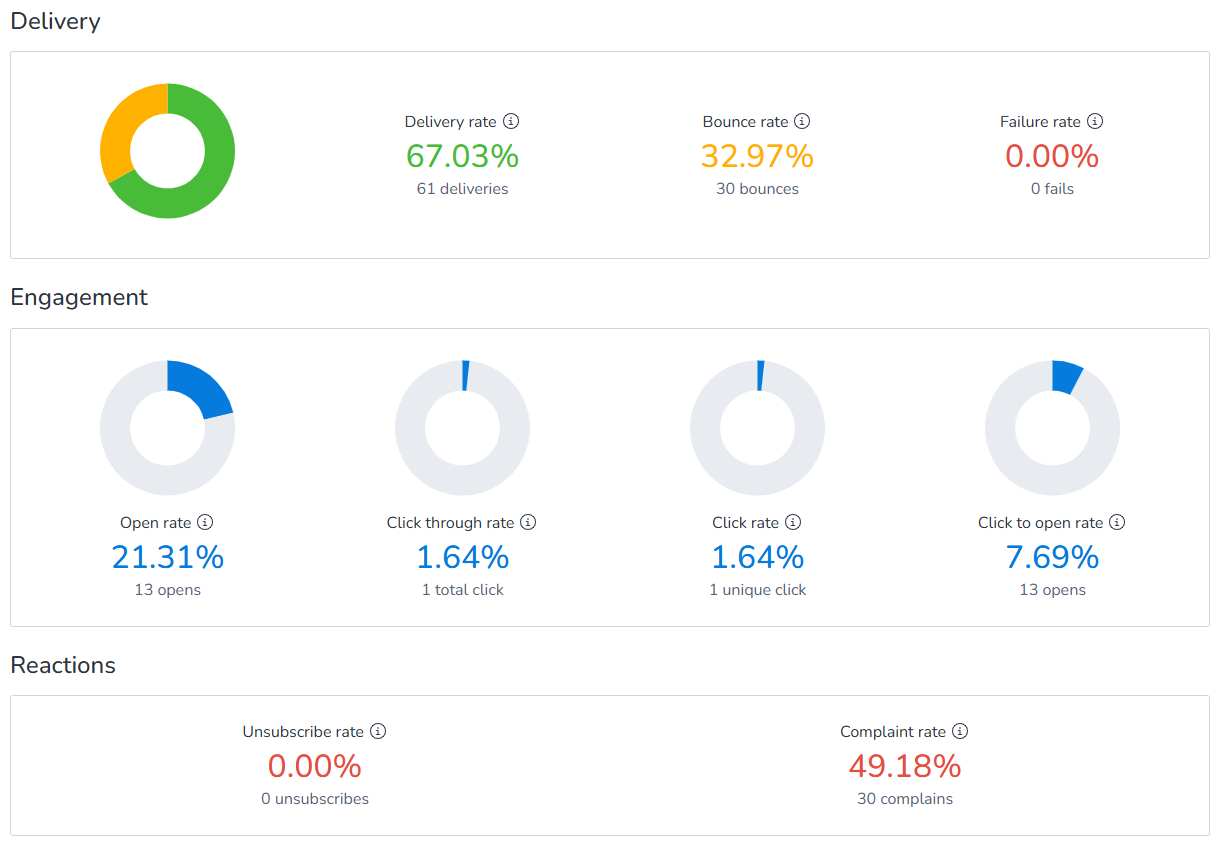
Also, the analysis of this campaign’s inbox placement health is below:
Delivery is severely compromised — nearly 1 in 3 emails never arrived.
- 67.03% delivery rate (only 61 of 91 emails delivered) is critically low. A healthy sender should be at 95%+. This means 30 emails were hard-bounced before even reaching a server, pointing to a seriously dirty list or invalid addresses being targeted.
- 32.97% bounce rate (30 bounces) is extremely dangerous. Anything above 2% raises red flags with ISPs. At this level, mailbox providers will likely start blocking or throttling your sending domain entirely.
- 21.31% open rate (13 opens) appears decent on the surface, but with only 61 delivered emails and 30 complaints, this number is misleading and not representative of real engagement at scale.
- 49.18% complaint rate (30 complaints), nearly half of the delivered emails were marked as spam. Google’s danger threshold is 0.30%; this is over 160x that limit. At this rate, inbox placement is essentially zero. ISPs will block future sends outright.
- 0% unsubscribe rate combined with a 49% complaint rate is a major red flag. Recipients have zero interest in the content and are defaulting straight to the spam button rather than unsubscribing. The worst possible signal a sender can send to ISPs.
- 1.64% click rate (1 click) is statistically meaningless at this sample size and offers no useful insight.
This campaign is in a deliverability crisis. The complaint rate and bounce rate are highest here. Continued sending at this rate will result in full domain blacklisting. Immediate action required: stop all sending, perform full list verification, audit consent records, and rebuild sender reputation gradually from scratch with a confirmed opt-in list only.
Best tools to improve email inbox placement rate
| Tool | Best For | Core Function |
|---|---|---|
| MailBluster | Reputation Building | Includes several email service providers, such as Amazon SES, Postmark, Mailgun, and SMTP2GO, that improve your email-sending reputation. |
| GlockApps | Detailed Testing | Uses Seed Lists (test accounts) to show exactly which folder your email hits across 70+ ISPs. |
| Mailgun Optimize | All-in-One | Combines list cleaning, reputation monitoring, and placement testing in one suite. |
| Warmforge / Lemwarm | Reputation Building | Uses AI to mimic human engagement (opening/replying), tricking filters into seeing you as a “trusted” sender. |
| ZeroBounce | List Hygiene | Heavily focused on removing “Spam Traps” and invalid emails that ruin placement. |
| Everest (Validity) | Enterprise | Provides deep analytics on ISP-specific delivery and competitive benchmarking. |
Final Thoughts
Inbox placement comes down to three things: a clean list, a solid sender reputation, and relevant content. Nail those, and mailbox providers will reward you with consistent delivery.
Don’t just hit send and hope for the best; monitor your metrics, authenticate your domain, and prune inactive subscribers regularly. You can use the top email marketing solution for inbox placement to accurately create an email campaign and have an enhanced inbox placement solution. Small habits compound into long-term deliverability success.
Your emails are only as powerful as their ability to reach the inbox. Make every send count.
FAQs
Authenticate your domain (SPF, DKIM, DMARC), maintain a clean list, avoid spam trigger words, and keep engagement rates high by sending relevant content to active subscribers.
It’s a metric (usually 0–100) that indicates the percentage of your sent emails that land in the recipient’s inbox rather than in spam or promotional folders.
Inbox placement refers to whether your email is delivered to the primary inbox, spam folder, or another tab. It goes beyond simple delivery and measures where the email ends up.
Use tools like GlockApps, MXToolbox, and Litmus to run seed tests that show where your emails land across major email providers.
In Gmail, go to Settings → Inbox → choose a layout (Default, Important first, etc.). In Outlook, use View → Layout to adjust the reading pane and folder arrangement.
 Contents