










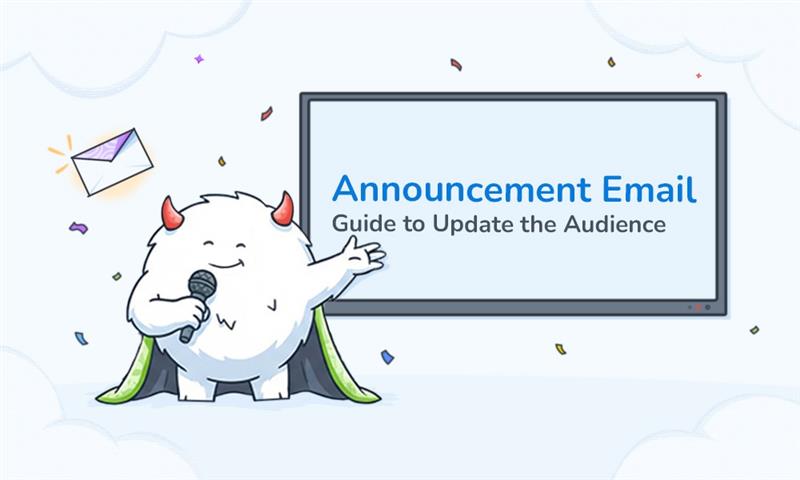
An announcement email benefits more than just updating audiences; it needs to be engaging to be fully worthwhile. Whether you’re launching a new product, updating your services, or celebrating a company milestone, announcement emails are your direct line to the people who matter most. Let’s dive into everything you need to know about crafting announcement emails that actually get opened and read.
In this blog, we will discuss announcement emails in detail. We will walk through topics such as what an announcement email is, when to send it, and how to write it, along with examples—so your announcement email content is effective, gets opened, and read.
Table of Contents
- What is an Announcement Email?
- Why You Should Send Announcement Emails?
- When Should You Send an Announcement Email?
- Quick Tips on How to Write an Effective Announcement Email
- How to Write an Announcement Email Using MailBluster?
- Why Use MailBluster for Announcement Emails?
- Announcement Email Template Examples
- Wrap Up
- FAQs
What is an Announcement Email?
Announcement emails are used to officially share news or updates with an audience in a clear, direct, and non-promotional way—while still encouraging engagement.
This approach ensures that the information is conveyed effectively without overwhelming the audience with sales tactics, fostering a more genuine connection. By inviting engagement, these emails can enhance communication and build community among recipients.
They are commonly used for:
- New product or feature launches
- Pricing or policy updates
- Company milestones
- Event announcements
Why You Should Send Announcement Emails?
According to businesses in the US and UK, email marketing delivers the highest ROI (return on investment), which is about 26.9%. So, you need to take essential marketing email campaigns seriously, and announcement email is one of them.
You might be wondering whether announcement emails are worth the effort. Here, learn the benefits, and you will realize it’s not just worth it but also essential for building a strong relationship with your audience.
Build trust and transparency
When you keep your subscribers informed about changes and updates, you’re showing them respect. Nobody likes being left in the dark, especially when it comes to products or services they use regularly. Announcement emails demonstrate that you value your customers enough to keep them updated.
Drive engagement and action
A well-crafted announcement email not only informs recipients but also inspires action. Whether you want people to try your new feature, register for an event, or simply learn more about your latest offering, announcement emails create that crucial moment of engagement.
Maintain brand awareness
Regular communication keeps your brand top-of-mind. Even if a subscriber isn’t ready to make a purchase right now, staying connected through timely announcements ensures you’re their first choice when they do need your product or service.
Create excitement and exclusivity
There’s something inherently exciting about being “in the know.” Announcement emails make your subscribers feel like insiders, creating a sense of exclusivity and community around your brand.
Reduce support inquiries
Proactive communication about changes, updates, or new features can significantly reduce the number of support tickets you receive. When people know what’s happening and why, they’re less likely to reach out with questions.
When Should You Send an Announcement Email?
Send an announcement email when you need to. Especially:
- Launch a new product or feature
- Notify users about system or pricing changes
- Share important company news
- Announce webinars, events, or releases
If the update impacts users, it deserves an announcement email.
Quick Tips on How to Write an Effective Announcement Email
- Use a clear, honest, and catchy email subject line. Avoid clickbait. Say exactly what the email is about. For example: “New Feature Launch: Smarter Email Automation Is Here.”
- State the announcement immediately. The first sentence should clearly mention the update. For example: “We’re excited to announce a new automation feature in MailBluster.”
- Highlight user benefits, not just features. Add other facilities, too. Explain key facts such as what’s changing and why it matters.
- Add at least one CTA (Call-to-Action) button. Even informational emails should guide users. Email CTA example can be: Try it now, Learn more, View details.
- Keep it short and scannable. Use bullet points, headings, and short paragraphs—especially for mobile readers.
How to Write an Announcement Email Using MailBluster?
MailBluster makes creating and sending announcement emails straightforward and efficient. Here’s how to craft your announcement email using this robust email marketing platform:
Step 1: Log in to your MailBluster account
Start by accessing your MailBluster dashboard: Sign in to your MailBluster account. If you haven’t set up your account yet, the onboarding process is simple and user-friendly.
Step 2: Create a new campaign
Navigate to the campaigns section and select “Create New Campaign.” Choose the email campaign option to begin crafting your announcement.
Step 3: Choose your audience
Select the subscriber list or segment you want to target with your announcement. MailBluster allows you to segment your audience, ensuring your message reaches the right people.
Step 4: Design your email
Use MailBluster’s email drag-and-drop editor to create your announcement. Also, you can either start from scratch or customize one of their premade responsive email newsletter templates. The drag-and-drop interface makes it easy to add images, format text, and arrange elements exactly how you want them.
Step 5: Craft your message
Write your announcement with these key elements in mind:
- A compelling subject line that creates curiosity
- A clear, concise headline that states what you’re announcing
- Body text that provides all necessary details without overwhelming readers
- Visual elements that support your message
- A clear call-to-action telling readers what to do next
Step 6: Personalize your email
Take advantage of MailBluster’s personalized email features. Adding the recipient’s name or other relevant details makes your announcement feel more personal and less like a mass email.
Step 7: Preview and test
Before hitting send, use MailBluster’s preview function to see how your email looks across different devices. Send test emails to yourself and team members to catch any errors or formatting issues.
Step 8: Schedule or send
Decide whether to send your announcement immediately or schedule it for an optimal time. MailBluster’s analytics can help you determine when your audience is most likely to engage.
Step 9: Track performance
After sending, monitor your email’s performance through MailBluster’s analytics dashboard. Track open rates, click-through rates, and other metrics to understand how well your announcement resonated.
Why Use MailBluster for Announcement Emails?
You can trust MailBluster because it stands out as an excellent choice for sending announcement emails, and here’s why:
Cost-effective solution
MailBluster pricing is highly affordable that won’t break your marketing budget. You get all the essential advanced features without the hefty price tag that comes with some other email marketing platforms.
Learn: MailBluster Pricing Plans Comparison: Starter vs Pro
User-friendly interface
You don’t need to be a technical expert to create professional-looking announcement emails. Their intuitive dashboard and drag-and-drop editor make the process accessible to everyone.
High deliverability rates
What good is an announcement if it lands in the spam folder? MailBluster prioritizes deliverability, ensuring your important messages reach your subscribers’ inboxes.
Advanced segmentation
You can send targeted announcements to specific groups within your email list using their email segmentation. This ensures that your messages are relevant to the people receiving them, increasing engagement and reducing unsubscribe rates.
Comprehensive analytics
Understanding how your announcements perform is crucial for improvement. MailBluster provides detailed insights into opens, clicks, bounces, and more.
Automation capabilities
Set up automated announcement sequences for onboarding new subscribers or following up after specific actions, saving you time while maintaining consistent communication.
Scalability
Whether you’re sending to hundreds or hundreds of thousands of subscribers, MailBluster can handle your needs as your business grows.
Reliable customer support
When you need help, MailBluster’s support team is there to assist you, ensuring you can keep your announcement emails flowing without interruption.
Announcement Email Template Examples
Need some inspiration to start your announcement email? Here are some proven announcement email template examples that you can utilize as samples for your needs:
1Business announcement email for company rebranding
Check out this business announcement email for company rebranding. You can use this announcement email template if you have the same purpose. Or take inspiration from it, notice how it is written to utilize in your announcement emails.
Subject: We’re Evolving: Say Hello to Our New Look
Dear [Name],
We have some important news to share about the future of [Company name].
After “X” years of helping businesses like yours streamline their data management, we’re excited to announce that we’re evolving to better reflect who we’ve become.
[Company’s previous name] is now [Company’s new name]
Our new name represents our expanded vision: helping companies achieve a seamless flow of information across all their systems, not just data synchronization.
What this means for you: We know change can raise questions, so here’s how this affects your experience with us:
-Your account and data remain secure and unchanged
-All existing services continue without interruption
-You’ll automatically get access to three new integration tools we’re launching next month
-Your login credentials stay the same (though our URL will change to [Website link] on [Date])Our Commitment: Despite these changes, we’re dedicated to continuing to provide you with the same exceptional service you’ve trusted for years, now with even more capabilities.
Timeline:
[Date]: New branding launches across all platforms
[Date]: Website migration to [Website link] (old URL will redirect)
[Date]: New integration tools available in your dashboard
Ongoing: Same great support team, same phone number, same commitmentWe’re excited about this new chapter and grateful to have you with us on this journey. If you have any questions or concerns, please don’t hesitate to reach out to our team at [Link] or call us at [Phone no.].
CTA: [Explore Our New Brand & Meet the New Tools]
P.S. Keep an eye on your inbox next week for an exclusive first look at our new integration features!
Thank you for your continued trust and support.
Warm regards,
[Name]
CEO & Co-Founder of [Company name]
2New Product Announcement Email – Storytelling Approach
The next announcement email template example is on the new product announcement that is written with a storytelling approach. New product launch is one of the common scenarios that requires to send announcement to the users. Use this announcement email template as it is. Or take inspiration or customize as you need.
Subject: We Built Something Amazing That You’re Going to Love
Hi [Name],
[X] months ago, our team gathered around a whiteboard with one question: “How can we help freelance designers showcase their work more effectively?”
After countless brainstorming sessions, late nights, user interviews, and iterations, we’re proud to announce: [New product] is here.
The Story Behind [Name of Company/Brand]:
We kept hearing the same frustration from customers like you: building a portfolio website required either expensive developers or clunky DIY tools that looked generic. Existing solutions were either too expensive for freelancers just starting out or too limited to truly showcase creative work.
We knew there had to be a better way.
What We Built:
[New product] is a no-code portfolio builder specifically designed for creative professionals. Unlike generic website builders, it understands the unique needs of designers, photographers, illustrators, and artists.
Here’s what you can do with it: → [New product benefits]
Built with You in Mind:
Every feature was designed based on real feedback from users like you:
[Attach one or two testimonials]
Ready to try it? We’re offering free premium features for life for the first [number] designers who sign up.
CTA button: [Start Your Free Trial]
We built [New product] for you. Now we can’t wait to see what you’ll accomplish with it.
Best regards,
[Name], Co-Founder & Head of [Company/Brand name]
3Product launch announcement email from a brand
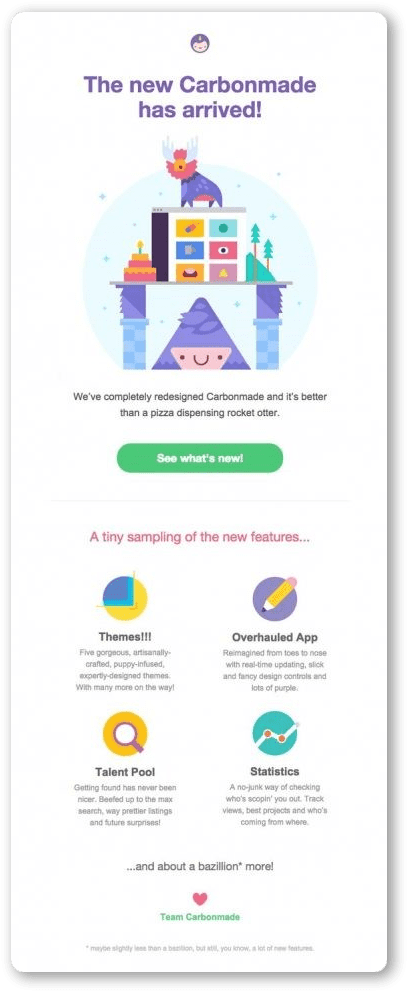
Here’s a product launch announcement email sample from the brand Carbonmade that you can take ideas from. They are introducing their recipients to their new design and features. It is simply well organized with essential details on the update, with email CTAs.
Wrap Up
We are at the end of this announcement email guide. You now know the essentials to include in your email marketing strategy for this particular email campaign type, a simple yet powerful way to communicate important updates to your audience. Remember the mantra: keep it clear, concise, and reader-focused; so your message gets delivered—and remembered. Whether you’re announcing a product launch, company update, or system change, following these best practices will help you create announcement emails that truly work and stand out. Use MailBluster and start sending your required announcement emails to your audiences.
FAQ on Announcement Email
The purpose of an announcement email is to inform subscribers about important updates while maintaining transparency, trust, and engagement.
Announcement emails are primarily informational, but they can include a soft call-to-action, such as learning more or trying a new feature.
An announcement email should be short and focused—typically 100–200 words—highlighting the update and next steps clearly.
MailBluster is an excellent tool for sending announcement emails due to its affordability, strong deliverability, segmentation features, and detailed analytics.
Yes. Sign up for MailBluster, and compose an email campaign using our handy drag-and-drop editor or use any suitable email newsletter template for an announcement email. MailBluster allows you to send unlimited emails to unlimited subscribers monthly, starting at $0.60.
 Contents

A helpful breakdown of how to structure an announcement email clearly and professionally to ensure your message gets noticed and understood.
Thanks for the feedback!