











Are you a small business owner wondering whether Mailchimp pricing in 2026 still makes sense for your marketing budget and seeking a full Mailchimp pricing breakdown? You’re not alone, and now you are in the right place. With inflation, tier changes, usage limits, and surprise fees, Mailchimp has become a costly choice, especially for startups, freelancers, and growing ecommerce brands.
In this blog, I will break down Mailchimp’s current pricing (Mar, 2026), uncover hidden costs many users overlook, and explain why more affordable alternatives like MailBluster are gaining traction among cost-savvy marketers.
Table of Contents
- What Is Mailchimp?
- Mailchimp Pricing Plans in 2026
- Hidden Costs You Need to Know
- Why Mailchimp is Becoming Expensive for Small Businesses
- Mailchimp Cost Examples at Different Subscriber Levels
- MailBluster Pricing 2026
- Mailchimp vs MailBluster: Side-by-Side Cost Comparison
- Why Mailchimp Gets Expensive, Especially for Small Business Owners
- Wrap UP
- FAQ
What Is Mailchimp?
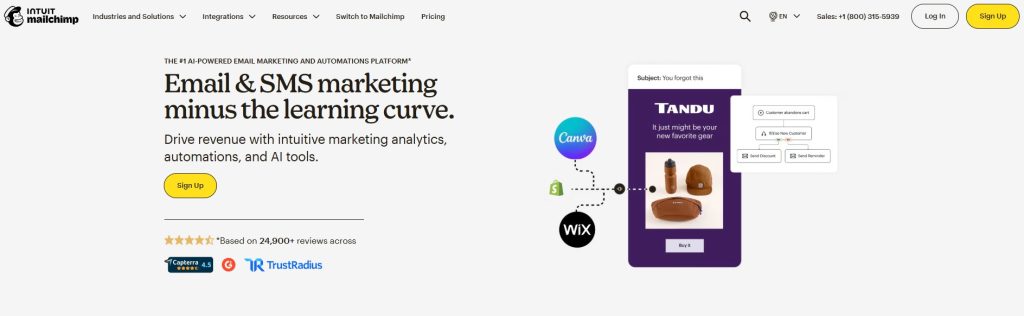
Mailchimp is one of the most well-known email marketing tools in the world. It is known for email marketing and its sophisticated automation options. It helps businesses send newsletters, grow their audiences, create registration forms, and track how well their campaigns are performing.
But even if people adore it, the prices aren’t as friendly anymore, especially for small businesses and people on a budget.
Mailchimp Pricing Plans in 2026
Here’s a simplified breakdown of the major Mailchimp pricing tiers you’ll encounter:
Free Plan
- Email sending limit:
- Max of 500 emails per month
- Or 250 emails per day
- Up to 250 contacts
- Limited features
- Basic automation
- Good for testing the platform
- Not suitable for growing lists
Essentials
- Starts from $13/month for up to 500 contacts
- Tiered by contact count
- Email sending limit: 10X contacts
- Removes Mailchimp branding
Standard
- Tiered by contact count
- Email sending limit: 12X contacts
- Advanced automations
- Starts from $20/month for up to 500 contacts
Premium
- Starts at $350/month
- Email sending limit: 15X contacts
- Unlimited audiences
- Comparative reporting
Note: Prices increase as your contact list grows.
Pay-as-you-go plan
Mailchimp also offers a flexible pay-as-you-go pricing plan. Here, users can buy email credits as an alternative to their monthly pricing tier. The credit block starts at 5000 credits, and it cannot be used with other Mailchimp pricing plans.
Hidden Costs You Need to Know
While Mailchimp advertises monthly plan rates, many extra charges are rarely mentioned upfront:
- Pay-as-you-go credits: If you don’t want a monthly plan, Mailchimp charges extra for individual email sends.
- Contact tier scaling: If your list grows by even a few contacts, your price can jump into a higher bracket.
- Overage fees: Exceed monthly sends or subscriber limits, and you may be charged unexpected fees.
- Add-ons: Features such as advanced reporting, specialized support, and premium templates may cost extra.
- Transactional emails: Mailchimp charges separately for transactional messaging, unlike some competitors that include this.
Why Mailchimp is Becoming Expensive for Small Businesses
Here are the biggest cost pressures small business owners face:
- Contact-based pricing — more contacts = more cost
- Feature gating — advanced features locked behind high tiers
- Upcharges for essentials — like landing pages, automations, and CRM features
- Scaling costs — as your business grows, pricing grows faster
For many small business owners, this means spending $100–$400+ per month, which can be hard on a tight marketing budget.
Learn: How Much Does Email Marketing Cost: Definitive Guide
What Mailchimp Charges Extra For
1. Contact overages
Mailchimp will charge you for additional contact blocks if your list grows beyond the plan you chose, even if it’s in the middle of your billing cycle. These fees are added on their own, so your efforts don’t stop.
2. Email sends overages
Each plan has a limit on the number of contacts you can send each month. For example, Essentials lets you send up to 10x contacts per month. If you go over that, you’ll be charged extra for extra blocks, which you’ll pay for on your next bill.
Mailchimp doesn’t publicly list exact overage prices. You’re referred to sales support, but users report real unexpected fees, billing surprises, and even large charges after accidental overages.
3. Duplicate contacts and unsubscribe count too
Mailchimp counts duplicate, unsubscribed, and non-engaged contacts toward your billing total, pushing you into higher tiers faster. This means that even if these contacts are not actively contributing to your email campaigns, they still impact the overall number of contacts you have. Consequently, these issues can lead to increased costs, as you may need to upgrade to a more expensive plan sooner than expected.
Mailchimp Cost Examples at Different Subscriber Levels
(Approximate costs based on tier pricing and market data; actual billed pricing may vary by plan and region)
| Subscriber count | Estimated Mailchimp Monthly Cost (Standard) | Notes |
|---|---|---|
| 500 | $20/month | Beyond the free plan — basic cost |
| 1500 | $45/month | Tier increases with contact count |
| 5,000 | $100/month | Email send limits also matter |
| 10,000 | $135/month | Hidden overages and add-ons are possible |
| 50,000 | $450/month | 5 seats |
| 100,000 | $800+/month | 5 audiences |
These numbers show how fast Mailchimp costs rise as your list grows — especially once you pass the Free and Essentials plans.
What can be your Mailchimp alternative that can make you save really big? Especially for small businesses, switching from Mailchimp is a wise decision. And you can consider MailBluster as one of the best Mailchimp alternatives. Let’s learn about its pricing.
MailBluster Pricing (2026)
By contrast, MailBluster pricing is much simpler and can be significantly cheaper for small and growing lists:
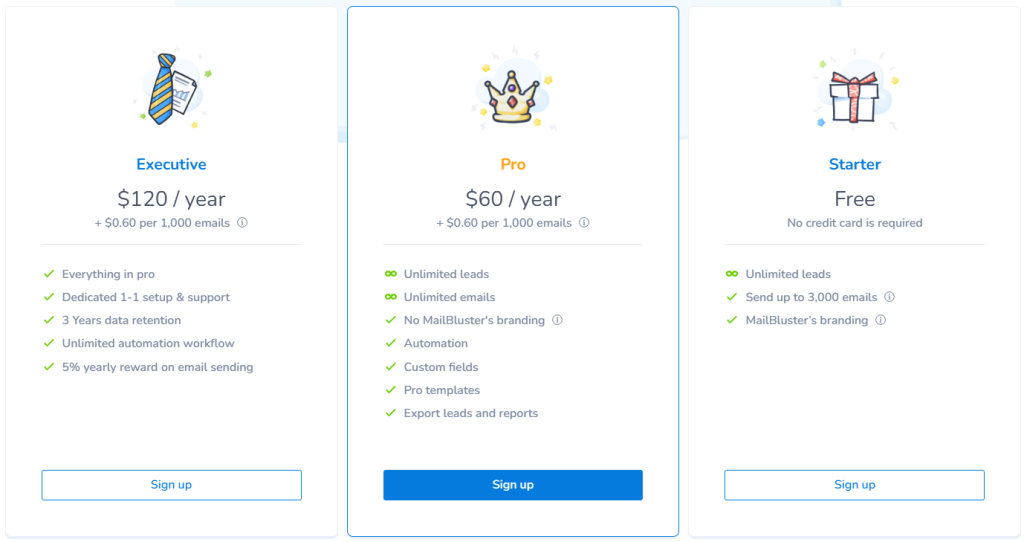
MailBluster Plans
Starter:
- Free: 3,000 email sends (one-time)
- MailBluster branding on emails
Pro:
- $60/year (equivalent to $5/month) base subscription fee.
- Starts at $0.60 per 1,000 emails sent
- Advanced email marketing features
- Unlimited subscribers (does not charge by list size)
Executive:
- $120/year base subscription fee.
- All features of Pro plan
- Starts at $0.60 per 1,000 emails sent
- Additional exclusive features
- Unlimited subscribers (does not charge by list size)
MailBluster Managed SMTP
Here, no need to set up SMTP; just send your campaign effortlessly. MailBluster’s own managed SMTP starts at the $17 price point. This is the monthly pricing; you can also select the yearly pricing option with a 10% discount, which starts at $15.30, depending on the email pack you choose.
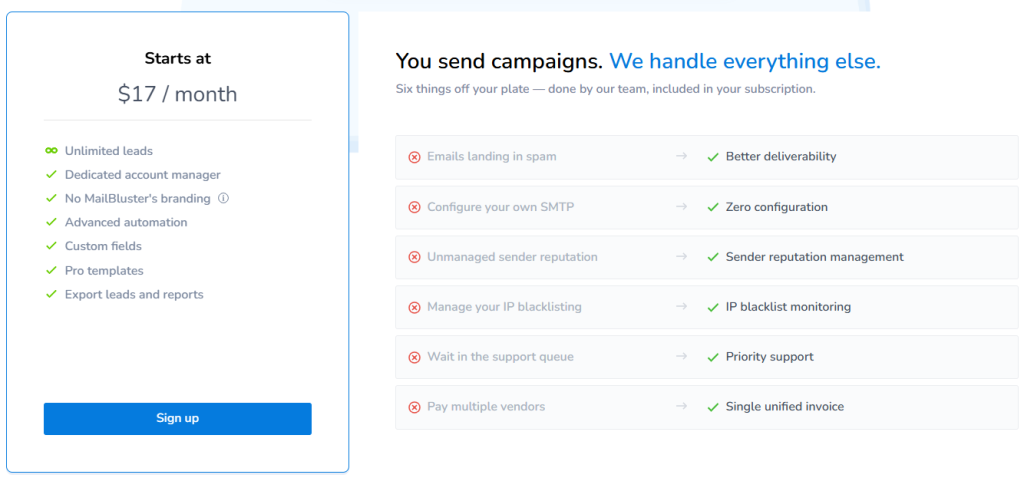
MailBluster doesn’t charge based on subscriber count — only on actual sent email volume. This keeps costs lower and more predictable for small businesses.
Mailchimp vs MailBluster: Side-by-Side Cost Comparison
| Feature | Mailchimp (2026) | MailBluster (2026) |
|---|---|---|
| Pricing model | Tier + subscriber count | Pay-per-email + low annual subscription fee |
| Overage fees | Limits trigger higher costs | Unlimited subscribers |
| Subscriber limits | Yes (contacts & sends) | No overage blocks |
| Cost for 10k subscribers | $110 – $135/mo | $6 |
| Cost for 50k subscribers | $450/mo | $30/mo |
| Hidden charges | Frequent (duplicate contacts, add-ons) | No hidden charges |
| Best for Small Biz? | Often too expensive | Cost-effective and scalable |
MailBluster assumes $0.60/1,000 emails — so sending 10k emails = $6; 50k emails = $30.
Why Mailchimp Gets Expensive, Especially for Small Business Owners
Let’s get the facts behind why Mailchimp gets expensive, especially for small businesses and startups.
Contact-based pricing that scales quickly
Mailchimp uses a contact-based pricing model, meaning you pay based on how many subscribers you store in your account—not just the ones you actively email. As your list grows, even by a small margin, you’re automatically moved into a higher pricing tier. For small businesses trying to scale steadily, this creates a situation where growth directly triggers higher monthly costs, sometimes before revenue increases enough to justify it.
Automatic tier upgrades and overage charges
Mailchimp also enforces monthly send limits based on your contact tier. If you exceed those limits, additional sending blocks are added automatically and charged on your next invoice. These overages can happen unexpectedly during promotional campaigns or seasonal spikes, making your bill unpredictable. For small businesses operating on tight marketing budgets, sudden cost increases can disrupt financial planning.
Paying for inactive or unsubscribed contacts
Unless manually archived or deleted, inactive, duplicate, or unsubscribed contacts may still count toward your total billable audience. Many small business owners don’t realize this until they notice unexplained pricing jumps. Maintaining a clean list requires ongoing management, which adds operational effort on top of rising subscription fees.
Feature gating behind higher plans
Many of Mailchimp’s advanced features, such as behavioral automation, detailed segmentation, transactional emails, and enhanced reporting, are locked behind higher-tier plans. As a business grows and needs more sophisticated marketing tools, upgrading becomes necessary, further increasing monthly expenses. Over time, what started as an affordable email marketing solution can become one of the largest recurring software costs for small businesses.
Quick takeaways: 4 reasons why Mailchimp gets expensive
- Subscriber-driven pricing—Mailchimp charges based on contacts — so more growth = higher bills.
- Overage fees hit you hard—Exceed your limits, and you pay more — often without clear pricing upfront.
- Hidden charges add up—Duplicate contacts, unsubscribes, and add-on tools such as SMS and transactional emails inflate monthly costs.
- Price increases over time—Mailchimp’s recent pricing hikes and reduced free tier mean many small businesses are pushed into paid plans earlier.
Wrap UP
We reached the end of this discussion on breaking down Mailchimp pricing. If you’re a small business owner, you need predictability and affordability, not surprise bills and complex tiers. Mailchimp can become very expensive due to contact-based pricing, hidden overages, and scaling charges. MailBluster keeps costs low and transparent, charging only for email sends plus a small annual subscription, making it ideal for smaller businesses or lean marketing budgets.
FAQ on Mailchimp Pricing Breakdown
Yes. Unsubscribed contacts still count toward your billing tier unless they are permanently deleted.
Mailchimp automatically adds extra email blocks and charges you on your next invoice.
Because pricing depends on:
-Contact growth
-Send volume
-Add-ons
-Plan upgrades are triggered automatically
It can be powerful, but for small businesses with tight budgets, pricing often becomes difficult to justify once your email list grows beyond 2,000–5,000 subscribers.
Yes, especially for most small and mid-sized lists. Since it doesn’t charge per contact, costs remain far lower as your audience grows.
If predictable pricing and cost control matter most, MailBluster is often the smarter choice. If advanced built-in CRM and brand recognition matter more, Mailchimp may still appeal.
Yes, Mailchimp charges for inactive contacts. Unless you archive or permanently delete inactive contacts, they can still count toward your billing tier. Simply having them stored in your audience may push you into a higher pricing bracket.
Mailchimp calculates pricing primarily based on the total number of contacts in your account, not just active subscribers. When your contact count crosses a threshold, your plan automatically upgrades to the next pricing tier.
No, Mailchimp does not always publicly display exact overage block pricing on its main pricing page. Additional charges for exceeding send limits or contact tiers are typically added to your next invoice automatically.
Yes, transactional emails are billed separately and are not included in standard marketing email plans. This can significantly increase total monthly costs for ecommerce businesses.
You can reduce overages by:
-Regularly cleaning inactive contacts
-Archiving unsubscribes
-Monitoring send limits
-Upgrading before exceeding limits
However, these require constant monitoring and list management.
Common reasons include: Sudden tier jumps, subscriber-based billing, add-on costs, and high pricing as lists grow. Many startups find that their costs increase faster than their revenue.
Yes, Mailchimp is more expensive than MailBluster. Especially as your list grows. While Mailchimp charges per-contact tiers, MailBluster charges primarily based on email-sending volume, which keeps costs predictable and often significantly lower.
For ecommerce brands sending frequent campaigns to large lists, predictable send-based pricing like MailBluster can offer better cost control. However, businesses that need built-in CRM and advanced integrations may still prefer Mailchimp despite the higher cost.
 Contents
