











Your email sender reputation is a significant factor in whether your emails get delivered, even after all the hard work you put into your email marketing. Spam emails made up 47.27% of all email traffic globally in 2024, and you need to make sure your emails don’t add up to this statistic. How well your email marketing strategy works depends largely on the sender reputation.
A good email sender reputation enhances deliverability and ensures that your emails reach the inbox rather than being filtered as spam. Which is why you need to regularly check email sender reputation. In addition, maintaining a positive email reputation is crucial for maximizing engagement and achieving campaign goals.
In this blog, I will discuss email sender reputation in detail to deepen your understanding of this topic. Plus, here you will learn about its importance and best practices for email sender reputation checks. So, let’s join in and read on!
Table of Contents
- What is Email Sender Reputation?
- Email Sender Reputation Example Scenarios
- How to Check Email Sender Reputation
- Wrap Up
- FAQ on Email Sender Reputation
What is Email Sender Reputation?
Email sender reputation is a credit score for email that Internet service providers (ISPs) and mailbox providers (MBPs) use to determine one’s trustworthiness as an email sender. It directly impacts the deliverability of your emails.
A strong email reputation increases the likelihood that your emails will reach the recipient’s main inbox, whereas a poor reputation makes them more likely to land in the spam folder. Or, MBPs can outright reject it.
This reputation is a complicated evaluation based on several things, such as how you send your email and how engaged the recipient is. It is a dynamic measure that might alter over time. Therefore, it’s crucial to always follow the best practices.
Why is the email sender reputation check important?
Email sender reputation is very important because it is the main factor that ESPs or inbox providers like Gmail, Yahoo, and Outlook use to figure out if your email should go to the recipient’s inbox, spam folder, or be ignored entirely.
A good reputation makes it easier to communicate and build trust, but a bad one hurts conversation, harms the brand’s image, and can even get you blacklisted.
Listed below are the 5 key reasons why email sender reputation checks are essential:
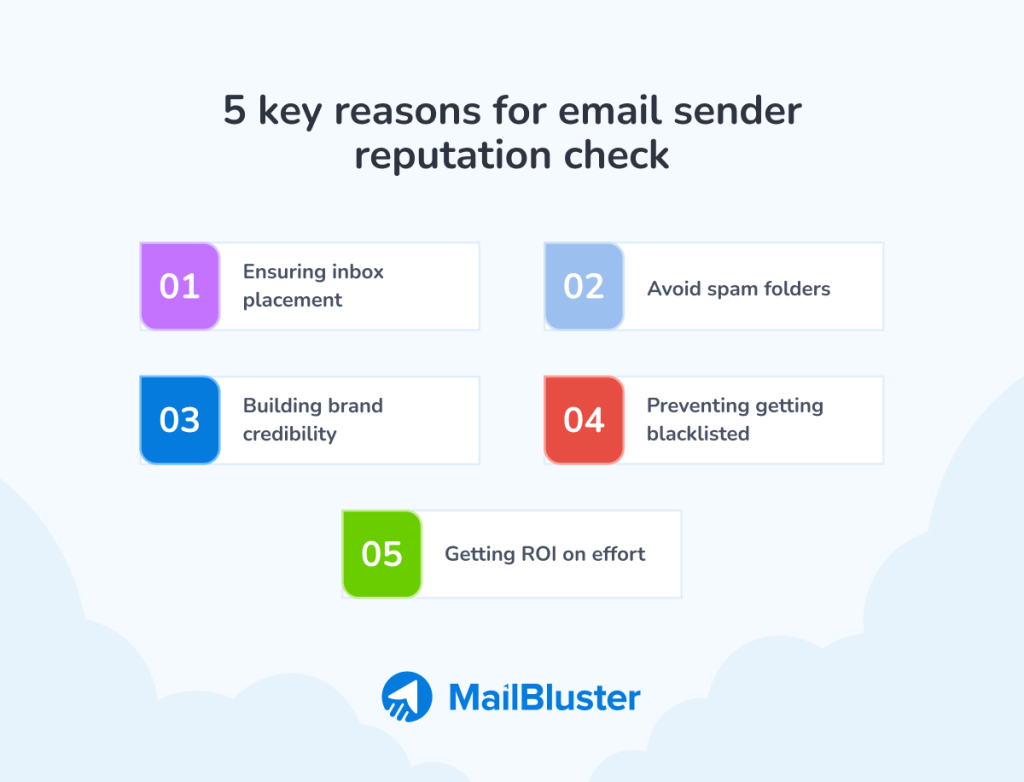
- A good reputation is required to reach the primary inbox.
- A low sender score means your emails will always land in junk folders.
- Providing regular inbox delivery helps to establish credibility and professionalism.
- If there are a lot of complaints or if you use bad methods, the IP/domain may be blacklisted.
- A regular email sender reputation check makes sure that the time and resources you spend on email marketing actually pay off.
Email Sender Reputation Example Scenarios
In this section, we will go through two scenario examples of two imaginary companies. Through it, you will understand how a company can end up with a good email reputation and a poor email sender reputation.
Example of a good email sender reputation
Let’s get a scenario example of having a good sender reputation:
Suppose there’s a brand or company named “ABC”:
- The company builds its email list organically by using a double opt-in process from the email marketing platform it uses. By doing so, they are ensuring all subscribers genuinely want to receive their emails.
- “ABC” maintains an email marketing calendar and sends a consistent weekly newsletter with relevant, engaging content.
- Additionally, they add an unsubscribe link in email content. Thus, they make it easy for those who want to unsubscribe and regularly clean their organic email list by weeding out inactive or bouncing email addresses.
- As a result, their brand emails perform well in terms of key email marketing metrics. For instance, they have high open and click rates along with a reduced email unsubscribe rate and low spam complaints.
- When Company “ABC” sends its emails, ESPs or mailbox providers such as Gmail and Outlook consider all the above mentioned things as positive signals. And they don’t mark them as red flag or spammer and place the messages in the recipients’ primary inboxes confidently.
Meaning, the “ABC” company has a good sender reputation with a good sender score.
Example of a poor email sender reputation
Now that you understand about good email reputation, let’s get a scenario example of having a poor email sender reputation:
Suppose there’s a brand or company named “XYZ”:
- The company XYZ opts for quickly growing their email list by doing some ill practices, such as purchasing a large list of email addresses from a data broker. Through which they often get old, invalid email addresses and spam traps.
- Unlike the company “ABC” they don’t maintain an email marketing calendar. And further, they send an immediate, high-volume email blast with generic, overly promotional content to that unengaged email list they have bought.
- Many emails get both hard and soft bounces because the addresses are invalid, and many recipients who never signed up for their newsletters unsubscribe and mark the messages as spam.
- Eventually, “XYZ” ends up getting poor email performance, especially due to poor open rate, click rate, and high unsubscribe rate.
- ESPs (email service providers) detect these negative metrics and flag the “XYZ” company as a potential spammer, lowering their sender reputation score dramatically.
- As additional cons, the subsequent emails from “XYZ,” even legitimate ones like order confirmations, get filtered directly to the spam folder. Or, even worse, get blocked entirely, severely damaging their business and brand image.
Meaning, the “XYZ” company has a poor sender reputation, and to improve their email reputation, they need to follow the same path the company “ABC” is following.
How to Check Email Sender Reputation
By now, you have learned why you need to check email sender reputation and take it seriously. Now moving on to learning some of the best practices on how to check email sender reputation.
Utilizing email reputation
If you don’t want to check manually, then a good way to check up on your sender reputation and sender score is to use a few different tools that collect data from email providers and security organizations and give you insights based on that. You can check out the best email sender reputation check tools, like:
- Google Postmaster Tools: You can get data specifically for Gmail deliverability.
- Microsoft SNDS: It can get you insights for Outlook and Hotmail users.
- Sender Score: It can give you a numerical score of 0-100 based on various metrics
- MxToolbox: It can check if your domain or IP is on major public blocklists.
Or, you can go for the manual assessment to get an idea of your email sender reputation status. And you can manually check sender reputation by monitoring the key metrics and factors. What are they? Let’s learn.
Monitoring key performance metrics
You can get early warning signs about email sender reputation issues by monitoring key performance metrics.
Spam complaint rate
The complaint rate for spam is considered one of the most critical metrics. You know, MBPs take user complaints, especially spam complaints, very seriously. The industry benchmark for it is 0.1%, which means one complaint per thousand emails sent. You need to aim for a complaint rate of below 0.1%. Higher rates are a major red flag that can lead to immediate blocking. So, if you see your spam complaint rate is more than 0.1%, then you have to up your game with best practices in order to improve email sender reputation.
Learn in detail: What is Complaint Rate?
Bounce rates
If you have a lot of email bounces for both hard and soft ones, ISPs and MBPs will know that you are not taking care of your email list, which will eventually hurt your email sender score. This can lead to marking your emails as spam or blocked altogether, reducing your overall deliverability.
Check bounce rates for:
- Hard bounces to identify invalid or non-existent email addresses. It indicates poor email list hygiene. Having many hard bounces indicates that ISPs and MBPs will view you as not managing your email list seriously. This can mark your emails as spam or blocked outright, reducing your overall deliverability.
- Soft bounces to detect temporary issues are less harmful but still require monitoring. These temporary issues can often resolve themselves, but keeping an eye on them ensures that they don’t develop into more serious problems that could affect email deliverability.
Learn more: Email Bounce Rate: Ways to Prevent High Bounce Rates
Check open, click, and engagement rates
You have to check email open rates, click rates, and engagement rates. Why? Because all these metrics tell a lot about your email performance, which eventually demonstrates the condition of your email sender reputation. ISPs keep an eye on how people connect with your emails.
For example, positive signals, such as opens, clicks, along with engagement: replies, and starring an email, are good for your image. On the other hand, not opening or deleting emails without reading them is a negative sign. The negative actions can lead ISPs and MBPs to mark your emails as spam, which can significantly impact your email deliverability. Therefore, maintaining a positive engagement rate is crucial for ensuring that your emails reach their intended recipients. If these rates are low, then you need to improve your email content.
Check unsubscribe rate
Another essential metric that you need to keep in check is the unsubscribe rate. Yes, monitor how many of your subscribers unsubscribe from clicking the unsubscribe link in your email.
A 0.2% or lower unsubscribe rate is considered to be great. If the unsubscribe rate is between 0.17% and 0.2%, then it indicates that your email list is mostly full of people who are interested in your email content and brand. Overall, an unsubscribe rate of 0.5% indicates you’re doing well. However, if it’s higher than that, then it means something is wrong, and the recipients are unhappy in some way. In that case, you have to improve your email strategy to reduce it.
Learn more: Unsubscribe Rate: How To Keep It Healthy
Apart from checking the key performance metrics, there is an essential technical fact that can improve email sender reputation.
Verify your business email
A good reputation is based on correctly following authentication protocols, and verifying your business email can help you with it. Because if you get a blue checkmark to verify your business email, it will cover all the protocols, such as:
- SPF (Sender Policy Framework)
- DKIM (DomainKeys Identified Mail)
- DMARC (Domain-based Message Authentication, Reporting, and Conformance)
Additionally, this helps prevent spoofing and phishing attacks. Plus, ISPs and MBPs consider verified email addresses to be authentic and non-spammers and look at them with a positive look.
Wrap Up
That was all for this discussion on email sender reputation! Having a good email reputation and sender score is essential for successful email marketing. Therefore, use an effective email marketing tool to check the key email performance metrics regularly and keep improving wherever needed to maintain a good email sender reputation to have a thriving email marketing.
FAQ on Email Sender Reputation
An email sender score of 90 or higher is generally considered good. If the sender score is between 50 and 80, then it needs work. Meaning, you are doing something that’s lowering your sender score and have to up your game to improve it.
Generally, most mailbox providers or MBPs see email senders with scores below 50 as spammers. Therefore, you should check if your score is that low; you need to make significant changes in your email sending practices.
Delivery and email sender score are casually linked. Inbox access requires high email sender scores, and low scores result in the email being sent to spam folders or blocked. Gmail, Outlook, and Yahoo give this score as a trust grade, and a good email sender reputation boosts deliverability. So, your emails are more likely to reach the main inboxes.
No, email sender score and deliverability are not the same. However, even though sender score and delivery are not the same thing, they are very similar, which is why some people confuse them to be the same. The health of your IP/domain is used to calculate your sender score. And on the other hand, deliverability is the result of your emailing effort: your emails reaching the primary inbox.
The best email sender can be MailBluster, Mailchimp, Moosend, or any other robust emailing tool that will align with your needs and budget.
Pay close attention to the email sender address, both the name and the domain. Especially notice the sender domain, which is the part after the “@.” It provides a lot of information about the actual sender of the email. Scammers often use names that look a lot like real ones, hoping you won’t see the difference. The legitimate email domain examples can be: [@]netflix[.]com, [@]mailbluster[.]com.
 Contents
